Make it yours
Your texts, your colors, your websites. Everything you can tune once Deskcord works.
Header and offline message
In any channel of your server, run:
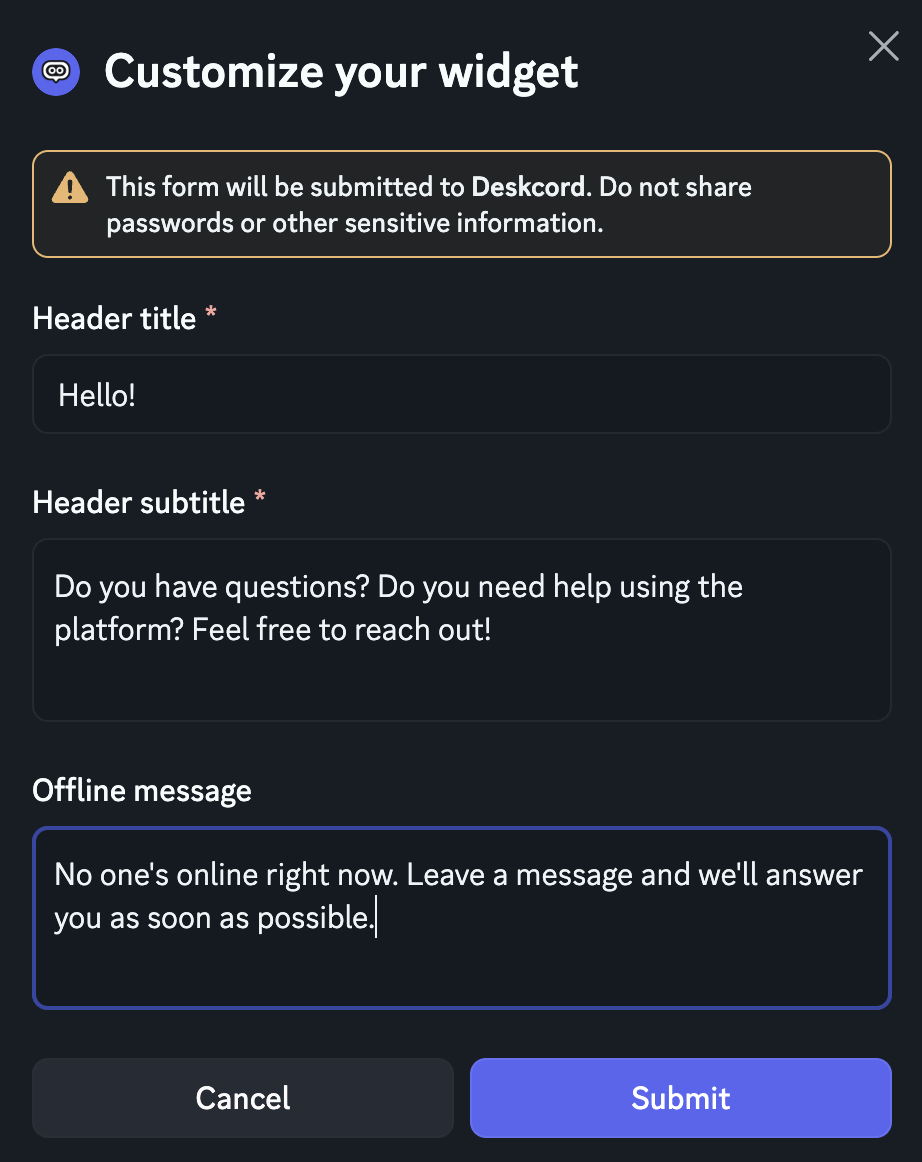
/customize-widgetA form opens with three texts:
- Header title, at the top of the chat window, for instance your product's name.
- Header subtitle, under it, for instance "We usually reply within an hour".
- Offline message, shown when nobody from your team is online in Discord, so visitors know when to expect a reply.
Changes show up on your website right away. Your embed code doesn't change.
Position
The chat bubble sits in the bottom-right corner of your pages. Move it to the bottom left, for instance if another button is already there:
/customize-widget position:bottom-leftLight or dark theme
The widget is light by default. Set the theme in your embed code: "dark", or "auto" to follow each visitor's system setting.
<script>
  window.deskcord = {
    settings: {
      app_id: "YOUR_APP_ID",
      theme: "auto", // "light" (default), "dark" or "auto"
    },
  };
</script>
If your site has its own dark-mode switch, tell the widget when it changes. It updates immediately:
// When your site's own dark-mode switch changes
window.deskcord.setTheme("dark"); // or "light", "auto"
Choose the websites it works on
Your widget code is visible in your pages, so anyone could copy it to their own site. Lock it to yours:
/set-allowed-domains add domain:yourwebsite.com- Discord suggests the websites your widget recently loaded on as you type.
www.yourwebsite.comis a separate domain: add it too if your site answers on both. They count as one website.*.yourwebsite.comcovers every subdomain, but not yourwebsite.com itself.- Development domains such as
localhostalways work. /set-allowed-domains listshows the list, andremovetakes a domain out.
While the list is empty, the widget works on any website.
Show it on some pages only
The widget appears on every page that includes its code. To keep it off some pages, such as checkout or an admin area, only include the code in the templates or layouts where you want the chat.
Deskcord Pro
Go further with Pro
Everything above works on Free. Pro makes the widget look like your brand and grows with your business:
Your brand colors
Pick the widget's primary color in the /customize-widget form, and the header gradient and text colors with /customize-widget gradient_color:#EB459E text_color:#FFFFFF. Every accent follows, and text stays readable on light colors.
Several websites, each with its channel
Add as many websites as you like, and send each one's conversations to its own channel: /set-allowed-domains add domain:shop.example.com channel:#support-shop. See the server setup guide.
Reply emails
A visitor left before you answered? Deskcord emails them your reply about 5 minutes later, with a link back to the page they were on. On by default, set up with /email-settings.
Customer details in Discord
Pass details such as the plan or signup date with identify(), and see them at the top of each conversation and in /customer-info. See identity verification.
Unlimited conversations
No monthly limit: every visitor can start a conversation.
$4.99 per month or $39.99 per year, for your whole team. No per-seat fees.
Or run /subscribe in your Discord server.
Manage your plan
/usageshows your plan and this month's conversations./subscribeupgrades to Pro, monthly or yearly./manage-subscriptionopens the billing portal: switch between monthly and yearly, update your card, download invoices or cancel.
If you cancel, your server goes back to Free at the end of the billing period. Your colors are kept for when you come back, and your conversations stay in Discord.
Stuck somewhere?
Open the chat on this page, we'll help you set it up.
Back to Help & Documentation